

Write the batch record as it happens: PLC SCADA training exercise
Batch number, time in every phase, totals and the peak temperature, closed the moment the batch ends.
Make the reactor keep its own batch record. Number each batch, time every phase as it runs, keep the charged totals, the time on hold and the peak temperature, and close the record with its result when the batch ends, complete or aborted.
No card. Nothing to pay. Nothing to cancel.
Official release: 5 December. Top the leaderboard on the day and win 3 months of Pro, plus 2 weeks of Pro to give a friend. 2nd place wins 4 weeks. 3rd place wins 2 weeks. Rules
- Every Coaching lesson, from zero
- Every mission and lesson, as you level up
- A practical test for every title, with a certificate
- Rewind any test, one scan at a time
- Worked solutions when you're stuck
- The code converter, as much as you like
 PRO (needs Pro) mission
A new batch starts a clean record
Test 1 of 3StartStart a batchOFFBatchNoBatch number1TimeAOutput5.18TotalAOutput20.72- Level
- Advanced
- Time
- About 45 min
- Reward
- +650 XP
- Rig
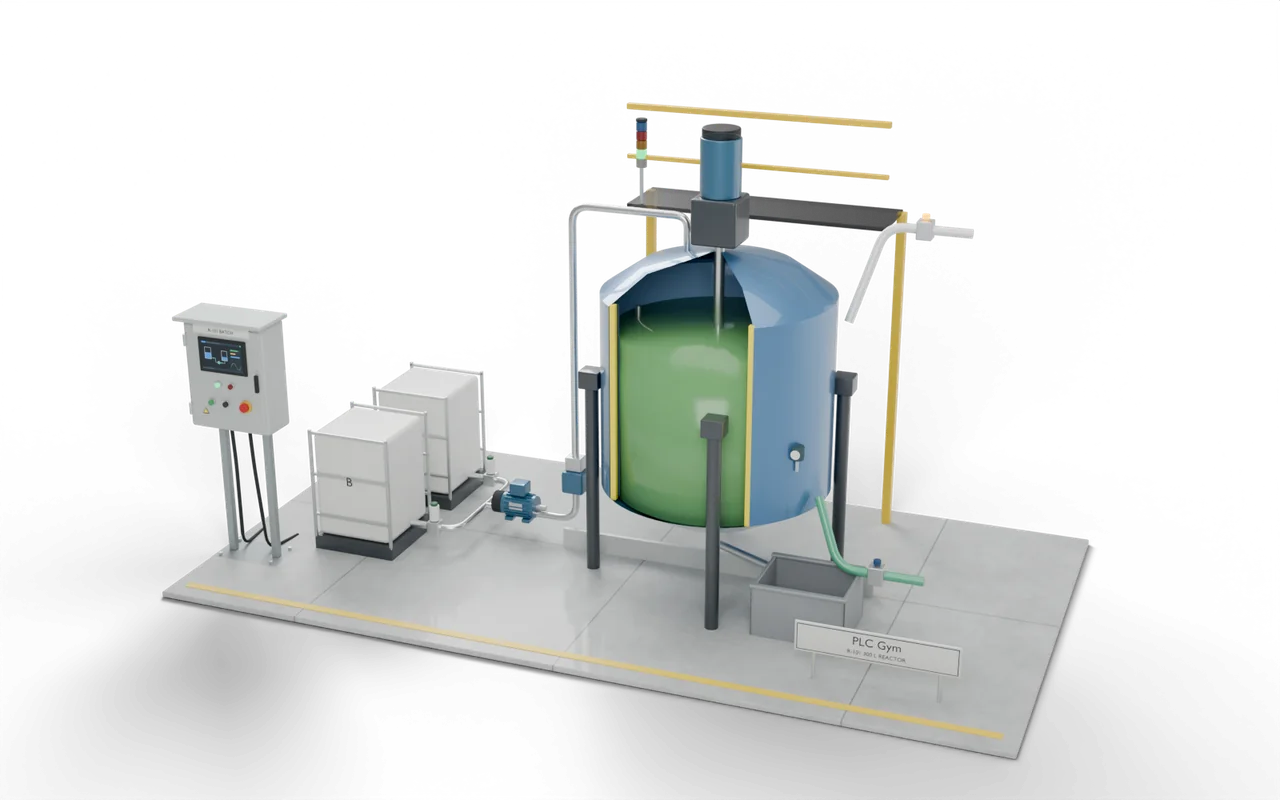
- 3D batch reactor control
- Siemens editors
- Ladder (LAD), SCL
- Rockwell editors
- Ladder, Structured Text
- Beckhoff editors
- Structured Text
- Stage
- 46. SCADA 4: a batch record as it happens
Write the batch record as it happens: what your code must do
The batch control is written and working. Write the record below it. A batch is in progress while State is 10 or 20: keep that in InBatch. When InBatch comes on, a new record starts: add 1 to BatchNo, set Result to 0, ReportReady to FALSE, every time to 0.0 and PeakTemp to Temp. While Run is on, add 0.02 each scan to the time of the phase in progress: TimeA in Phase 1, TimeB in 2, TimeHeat in 3, TimeReact in 4, TimeCool in 5, TimeDrain in 6. While State is 20, add 0.02 to TimeHeld instead. While InBatch is on, PeakTemp follows Temp upwards and never down, TotalA copies VolA and TotalB copies VolB. The batch ends when State reaches 40 or 30: set Result to 1 for complete or 2 for aborted, and ReportReady to TRUE. After that nothing in the record changes until the next batch starts. On the Operator screen tab, choose how the report writes a time, what it shows beside each value, and what an aborted batch gets.
- New batch
- InBatch comes on: BatchNo + 1, Result 0, ReportReady off, times 0, PeakTemp := Temp.
- Times
- 0.02 a scan to the phase in progress while Run; to TimeHeld while State is 20.
- End
- State 40: Result 1. State 30: Result 2. Both set ReportReady, and the record stops.
Write the batch record as it happens: inputs and outputs
Your program reads 9 inputs and sets 23 outputs. One more input drives the simulation or shows a reading, for you to test with. The names are the same in every maker’s editor.
Write the batch record as it happens: what the tests check
- Each Start begins a new record: BatchNo goes up by one and every value starts clean.
- Each phase's time counts only while that phase runs; time on hold is counted on its own.
- PeakTemp is the highest temperature of the batch; TotalA and TotalB are the litres charged.
- When the batch completes or aborts, Result says which, ReportReady comes on, and the record stops changing.
- The report writes times as minutes and seconds, shows each target beside its value, and gives an aborted batch a report too.
- Try it Use the buttons below the model and watch the rig respond.
- Test solution Every check runs on your code in one press.
- Rewind PRO (needs Pro) If one fails, step back through it one scan at a time to see why.
Stuck on this mission? Ask the members in the Locker Room.
Where you’d see this on site
In a pharmaceutical or food plant, every batch leaves a record that quality staff review before the product is released. The SCADA collects it from the PLC the moment the batch ends.
A batch with no record can't be released, and a record written after the event can't be trusted. Either way a day's production is held or scrapped.
Chemical, pharma and food batch plants follow recipes in phases. Operators can hold a batch and restart it, or abort it; the controller must know exactly what is safe in every state. Some reactions release heat, and if cooling falls behind they run away.
- ChargeA, then B
- React80 °C for 30 sYou are here
- CoolTo 40 °C
- DischargeTo receiver
On a real site: places, parts and safety
- Speciality chemicals and resins
- Pharmaceutical and biotech batch suites
- Food ingredients and flavours
Runaway reactions caused disasters such as Seveso (1976) and T2 Laboratories (2007). Real reactors have independent high-temperature trips and relief systems.
ISA-88 defines the state model used here, so operators everywhere know what Hold and Abort mean.
The sizes, timings and cutaways are teaching choices, not a drawing of any one real installation.
Next on the road
 89One alarm block for every alarmNew, seen, cleared: one loop takes every alarm through the same states and marks the one that came first.Expert · 45 min · +800 XP
- 87Log what explains a stopStore a value when it changes enough, never go silent, then read the trend to find what failed.Advanced · 45 min · +500 XP
- 86One screen for the whole plantFour stations report one state each, and the overview says which one needs you.Advanced · 40 min · +650 XP
- 85Run the whole factoryStart-up, batching, bottling, rejects, robot, wrapper, AGV and safety: one program for the whole plant.Expert · 240 min · +3000 XP